
Simple Marker Generator


Here are a Simple Electronic Schematic Circuit Project of Marker Generator.  The marker generator circuit explained here is a constant- frequency oscillator driving into a CMOS divider chain. Switchable out- puts from the divider chain are selected to drive a pulse generator.  The oscillator is C1a in which R1 biases the IC into linear operation. The crystal determines the basic frequency of operation at 4 MHz in conjunction with C1, 2, 3 and 4 which appear to the crystal as one parallel capacitor.

Simple Marker Generator Circuit Diagram:
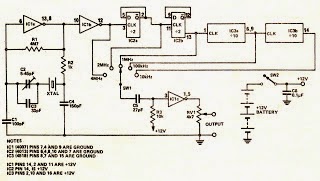
Generator Circuit Diagram

The capacitor C2 is  used to tune the oscillator exactly to frequency as explained in the text. The resistor R2 adds extra phase shift but also reduces the gain. Thus if the oscillator is slow in starting reducing R2 may help. The output of the oscillator is buffered from the rest of the circuit by IC1 /b. lC2 is a CMOS dual type D flip flop that divides the 4 MHz by four to provide an out put of 1 MHz, the 2 MHz also being brought out. 

A further dual division by 10 is provided by lC3 which therefore provides outputs of 100 kHz and 10 kHz. The required output is selected by SW1 and applied to C5 and R3 which differentiate the square wave output of the divider. The waveform is then amplified and squared by IC1/c to provide an output train of narrow pulses, the amplitude of which may be varied by means of RV1.


Comments

Popular posts from this blog

Digital Fan Regulator Circuit Diagram

This is the project of Digital Fan Regulator Circuit diagram. The circuit presented here can be used to control the speed of  fans using induction motor. The speed control is nonlinear, i.e. in steps. The current step number is displayed on a 7-segment display. Speed can be varied over a wide range because the circuit can alter the voltage applied to the fan motor from 130V to 230V RMS in a maximum of seven steps.  The triac used in the final stage is fired at different angles to get different voltage outputs by applying short-dura-tion current pulses at its gate. For this pur-pose a UJT relax-ation oscillator is used that outputs sawtooth waveform. This waveform is coupled to the gate of the triac through an optocoupler (MOC3011) that has a triac driver output stage.  Pedestal voltage control is used for varying the firing angle of the triac. The power supply for the relaxation oscillator is derived from the rectified mains via 10-kilo-ohm, 10W series dropping/limit-ing...

Using the SG3525 PWM Controller Explanation and Example Circuit Diagram Schematic of Push Pull Converter

PWM is used in all sorts of power control and converter circuits. Some common examples include motor control, DC-DC converters, DC-AC inverters and lamp dimmers. There are numerous PWM controllers available that make the use and application of PWM quite easy. One of the most popular of such controllers is the versatile and ubiquitous SG3525 produced by multiple manufacturers – ST Microelectronics, Fairchild Semiconductors, On Semiconductors, to name a few. SG3525 is used extensively in DC-DC converters, DC-AC inverters, home UPS systems, solar inverters, power supplies, battery chargers and numerous other applications. With proper understanding, you can soon start using SG3525 yourself in such applications or any other application really that demands PWM control. Before going on to the description and application, let’s first take a look at the block diagram and the pin layout. Pins 1 (Inverting Input) and 2 (Non Inverting Input) are the inputs to the on-board error amplifier. If you a...

Automatic Intruder Alarm Circuit Diagram

Description: This is a simple single-zone burglar alarm circuit. Its features include automatic Exit and Entry delays and a timed Bell/Siren Cut-Off. It's designed to be used with the usual types of normally-closed input devices such as - magnetic reed contacts - micro switches - foil tape - and PIRs. But it can be Easily Modified to accept normally-open triggering devices - such as pressure mats. Circuit Diagram   Notes:   It's easy to use. First check that the building is secure and that the green LED is lit. Then move SW1 to the "set" position. The red LED will light. You now have about 30 seconds to leave the building. When you return and open the door - the Buzzer will sound. You then have about 30 seconds to move SW1 to the "off" position. If you fail to do so - the relay will energize and the Siren will sound. While at least one of the switches in the normally-closed loop remains open - the Siren will continue to sound. However, about 15-minutes aft...